Sunday, April 27, 2014

Week 13-Outside of Class

This weekend outside of class, I reviewed the feedback I got in my webpage from the mid-critique and applied it to my revisions. I have gotten rid of the majority of my colored boxes, and instead used a line underneath each title. I also changed my background to a more subtle green paper texture, and added some more illustrations throughout the page. As far as my color scheme goes, I feel that lighter, more natural colors would work best. I am still not sure about it, but I feel better about this versus what I had before. My Select a Design box is hanging out at the bottom right now, mostly because I am still unsure of how to place it beside my wrapper, and will inquire about it class.


Week 13B: April 23

Today in class, we had a full critique of the progress of our websites, and received feedback on how to fix it. The feedback I received included not using so many colored boxes, change the position of the side bar (Select a Design), change color scheme, and the background wasn't quite working either. I plan on taking this feedback into consideration since I am still unsure of where I want to place my sidebar. I am thinking about placing it to the right of my wrapper as I have done in my sketches, but I am still figuring out how to do that.

Homework:
- web page 60% done by next class

Monday, April 21, 2014

Week 13A: April 21

Today was a work day once again, and I continued to work on improving my page. I am still figuring out the color scheme, but I am pretty sold on the arrangement of the boxes.

*Homework*:
-have web page 30-40% done in HTML/CSS working in the browser next class (change dog bowl to illustrations of dog, move dog bowl to Left of main content, dog paws as bullets)
- we will have a full class critique next class. Please have HTML and sketch ready to show to class

Week 12: Outside of Class

Over the weekend, I have edited my site. I changed the background, aligned the header with the wrapper, changed the colors of the wrapper, and added the textured dog bowl. I feel that this is stronger than before, and am confident in using this color scheme. However, I would like to integrate the orange in the header somewhere in the page.


Wednesday, April 16, 2014

Week 12B: April 16

Today was a work day, and I began to integrate the HTML to get a sense of what it looks like with the content added, and to also make sure that it works properly. I still have a way to go yet as far as the overall design goes, but I am more comfortable now that I added the required HTML into the page and it all works.


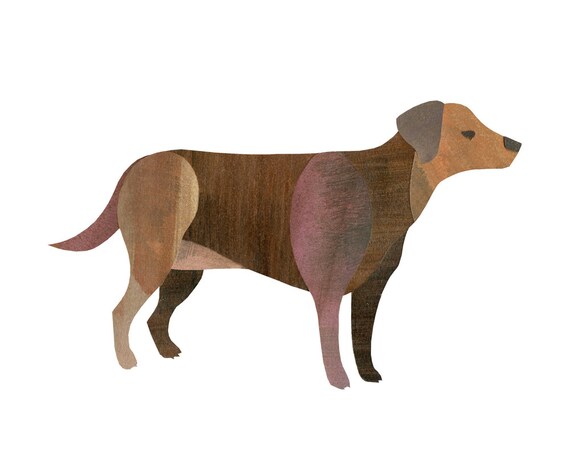
I also plan on integrating this image I illustrated to either go beside each section title or as bullet points for each design selection.

Homework
-Read: Ch. 7 & 8 in Above the Fold
- Have web page 15% done in HTML/CSS (change size of body copy and add another illustrated element)

Monday, April 14, 2014

Week 12A: April 14

Today in class, we mainly just worked on our projects again, and met up with the professor in terms of our progress and any questions we may have. I am on the right track with my dog illustration, and have learned how to use a texture on it to increase the cut paper/illustrated look that I am going for. I am satisfied with how it is turning out and that I have finally established my style for this project. Next, I must work on how I want to design the web page, which I will need some help with.


Homework
- finish what you did not have done today (full HTML/CSS framework)
-develop more visual assets for web page!

Week 11: Outside of Class

This week outside of class, I worked on my rough layout for the web page, and continued to assess which style of dog illustrating I wanted to use. After thinking it through, I decided to combine both the illustrated and cut paper style into one, to create a more unique look, which you will see below. For the webpage, I essentially would like to use a grassy background, but I feel that the one that I have now is too distracting from the rest of the page.


Thursday, April 10, 2014

Week 11B- April 9

Today in class, we were mainly given in class work time to work on our projects. I am still working on my sketches and illustrations in order to figure out which style to go with. It was suggested to me to use a cut paper style or folded paper dogs, and just take a picture of them, which would be easier considering my illustration skills aren't the best. Below is an example of cut paper style and folded paper dogs.
Cut paper style
Folded paper 


Homework:
- read ch. 5-6 in Above the Fold
- Finish HTML/CSS frame work
- create one creative asset (approved by Pannafino)

Tuesday, April 8, 2014

Week 11: Dog Sketches

Here are the sketches I have been working on to get an idea of how exactly I would like my dogs to look on the web page. I am more leaning toward a less realistic rendition of a dog, and more of a cute cartoon feel.


Monday, April 7, 2014

Week 11A: April 7

Today in class, we mainly looked at each others' pencil sketches and layouts, and critiqued them. Some feedback I got about mine was to change the side bar to match the color of the left side of the page, change the "Beauty of CSS Design" to fit within the wrapper centered in the middle of the page, and include the dog in the middle of "Zen Garden" to create a better balance.
After meeting up with  the professor, I was told to work on sketches and illustrations on the computer for my dog to figure out an illustration style for the dog. I am thinking about leaning toward a more simplistic version to add to the playfulness. I will upload images of my sketches and illustrations in another post.

Homework:
-Based on class comments, make adjustments and create a new final detail layout sketch for next class or begin design of web page.

Week 10- Outside of Class

This week outside of class, I worked on the two pencil sketches to demonstrate what my potential web page layout would look like, which you will see below. For the sketches, I went off of the idea of dogs playing outside, which is why you see dog toys at the bottom representing the icons for HTML, CSS, and such in the second sketch. In the first one I kept the outside playfulness, but instead focused more on the dogs rather than their toys, rearranged the div boxes, and added a playful orange color  to make the information in the center of the page pop out a bit more. Somehow I would like for the "CSS Zen Garden" header to remain at the top of the page in the first sketch as you scroll down, or for the grass to remain at the bottom of the page as you scroll in the second sketch. I feel like both have some good elements to them, but have much room for improvement, and I hope that with the help of suggestions from my classmates I can turn these simple sketches into a successful web page.


Week 10B-April 2

Today in class, we went over some more fundamentals of coding, and troubleshooted some problems we were having. I learned how to essentially create a better layout for my page, such as centering horizontally and vertically, which is different from what I though since there is technically no function to do that, instead I need to adjust the padding and height of the box, and text-align center. We also looked at some pages with successful CSS layouts, which helped to give me a better idea of how I would like to layout my page.

I have officially decided that for my project I would like to do the CSS Zen Garden, and use a cute dog theme. I will upload my ideas in the next post!

Homework:
-Create 2 detailed pencil sketches of web page layout, 11x17(show page layout) with tracing on top of it with div regions drawn out (spacing, margins, header, boxes, etc)

Read:
Above the Fold: Ch. 3-4
IID:
- Activating Computer space
- Entry Point
- Cognitive Load
- Minimum Usage Design

Wednesday, April 2, 2014

Week 10: Webpage Homework (from week 10A)

Below you will see the web pages I designed for this week's homework.  I chose a sans serif font for both the headers and body to represent the simple elegance and playfulness of the Siberian Husky. The background remained the same as before, and I added links to each page on every page, so you can essentially navigate to whichever page you want from whatever page you are at.


Week 10A-March 31

Today in class, we looked at a few classmates' webpages, including mine. I was told that it was done very well, and to possibly edit my graphic of the Siberian Husky and make him look more detailed, especially in the face.

We then did another tutorial of coding, and learned how to put headers, main content, sidebars, and footers into the page. I have to say I learned alot on how to set up a web page, which is easier now since I have some experience with coding from an internet programming class. Since I didn't exactly learn how to design  the page and set it up per say, the tutorial was very helpful.

We were then introduced to our next project, which was to design a webpage. I have a choice between three different types, Lorem Ipsum, CSS  Zen Garden, and a page for our previous app project. Either way, I must choose a theme for it, which I am thinking about a dog theme.


Homework:
-pick a theme for project
- write about 300 words about spirit animal. Create another web page with a multiple column layout, image of animal and written copy (page 2)
    -Wrapper: 1000px wide
    - show animal, name, and body paragraph beside or below it. Use Google Fonts for title and body
3 PAGES

Week 9: Outside of class

This week outside of class, I worked on the small web page we were supposed to make. I chose a siberian husky, not just because they are one of my favorite dogs, but they are also very kind, gentle, family-oriented, and intelligent. I feel my personality reflects some of these characteristics, except for intelligence (don't want to sound too conceded!) I illustrated my own version of the Siberian Husky, even though I feel it is a bit simplistic, as I'm not quite an expert yet on illustrator. Below you will see my web page.